
R21xx-HP FlexFabric 11900 Layer 3 IP Routing Configuration Guide





299
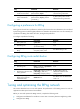
Configuring RIPng timers
You can adjust RIPng timers to optimize the performance of the RIPng network.
When you adjust RIPng timers, consider the network performance, and perform unified configurations on
routers running RIPng to avoid unnecessary network traffic or route oscillation.
To configure RIPng timers:
Ste
p
Command
Remarks
1. Enter system view. system-view N/A
2. Enter RIPng view.
ripng [ process-id ] [ vpn-instance
vpn-instance-name ]
N/A
3. Configure RIPng
timers.
timers { garbage-collect
garbage-collect-value | suppress
suppress-value | timeout
timeout-value | update
update-value } *
By default:
• The update timer is 30 seconds.
• The timeout timer is 180 seconds.
• The suppress timer is 120 seconds.
• The garbage-collect timer is 120 seconds.
Configuring split horizon and poison reverse
If both split horizon and poison reverse are configured, only the poison reverse function takes effect.
Configuring split horizon
Split horizon disables RIP from sending routes through the interface where the routes were learned to
prevent routing loops between neighbors.
HP recommends enabling split horizon to prevent routing loops in normal cases.
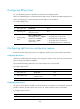
To configure split horizon:
Ste
p
Command
Remarks
1. Enter system view. system-view N/A
2. Enter interface view.
interface interface-type
interface-number
N/A
3. Enable split horizon.
ripng split-horizon By default, split horizon is enabled.
Configuring poison reverse
The poison reverse function enables a route learned from an interface to be advertised through the
interface. However, the metric of the route is set to 16, which means the route is unreachable.
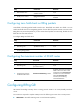
To configure poison reverse:
Ste
p
Command
Remarks
1. Enter system view.
system-view N/A