
R21xx-HP FlexFabric 11900 Layer 3 IP Routing Configuration Guide

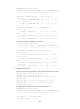




300
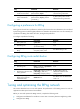
Ste
p
Command
Remarks
2. Enter interface view.
interface interface-type
interface-number
N/A
3. Enable poison reverse.
ripng poison-reverse
By default, poison reverse is
disabled.
Configuring zero field check on RIPng packets
Some fields in the RIPng packet header must be zero. These fields are called "zero fields." You can
enable zero field check on incoming RIPng packets. If a zero field of a packet contains a non-zero value,
RIPng does not process the packets. If you are certain that all packets are trustworthy, disable the zero
field check to save CPU resources.
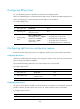
To configure RIPng zero field check:
Ste
p
Command
Remarks
1. Enter system view.
system-view N/A
2. Enter RIPng view.
ripng [ process-id ] [ vpn-instance
vpn-instance-name ]
N/A
3. Enable the zero field check on
incoming RIPng packets.
checkzero By default, this feature is enabled.
Configuring the maximum number of ECMP routes
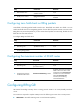
Ste
p
Command
Remarks
1. Enter system view. system-view N/A
2. Enter RIPng view.
ripng [ process-id ] [ vpn-instance
vpn-instance-name ]
N/A
3. Configure the maximum
number of ECMP routes.
maximum load-balancing number
By default, the maximum number of
ECMP routes is the same as that
configured in the max-ecmp-num
command. For more information
about the max-ecmp-num
command, see IP Routing
Command Reference.
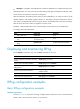
Configuring RIPng GR
GR ensures forwarding continuity when a routing protocol restarts or an active/standby switchover
occurs.
Two routers are required to complete a GR process. The following are router roles in a GR process:
• GR Restarter—Graceful restarting router. It must have GR capability.