
R21xx-HP FlexFabric 11900 Layer 3 IP Routing Configuration Guide

312
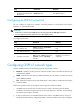
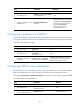
Ste
p
Command
Remarks
5. (Optional.) Specify a cost for
the default route advertised to
the stub area.
default-cost value The default setting is 1.
Configuring an OSPFv3 virtual link
You can configure a virtual link to maintain connectivity between a non-backbone area and the
backbone, or in the backbone itself.
IMPORTANT:
• Both ends of a virtual link are ABRs that must be configured with the vlink-peer command.
• Do not configure virtual links in the areas of a GR-capable process.
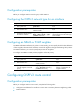
To configure a virtual link:
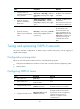
Ste
p
Command
Remarks
1. Enter system view. system-view N/A
2. Enter OSPFv3 view.
ospfv3 [ process-id | vpn-instance
vpn-instance-name ] *
N/A
3. Enter OSPFv3 area view.
area area-id N/A
4. Configure a virtual link.
vlink-peer router-id [ dead seconds |
hello seconds | instance instance-id |
retransmit seconds | trans-delay
seconds ] *
By default, no virtual link is
configured.
Configuring OSPFv3 network types
OSPFv3 classifies networks into the following types by the link layer protocol:
• Broadcast—When the link layer protocol is Ethernet or FDDI, OSPFv3 considers the network type
as broadcast by default.
• NBMA—When the link layer protocol is ATM, Frame Relay, or X.25, OSPFv3 considers the network
type as NBMA by default.
• P2P—When the link layer protocol is PPP, LAPB, HDLC, or POS, OSPFv3 considers the network type
as P2P by default.
Follow these guidelines when you change the network type of an OSPFv3 interface:
• An NBMA network must be fully connected. Any two routers in the network must be directly
reachable to each other through a virtual circuit. If no such direct link is available, you must change
the network type through a command.
• If direct connections are not available between some routers in an NBMA network, the type of
interfaces associated must be configured as P2MP, or as P2P for interfaces with only one neighbor.