
R21xx-HP FlexFabric 11900 Layer 3 IP Routing Configuration Guide

314
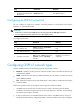
Configuring OSPFv3 route summarization
If contiguous network segments exist in an area, you can use the abr-summary command to summarize
them into one network segment on the ABR. The ABR will advertise only the summary route. Any LSA
falling into the specified network segment will not be advertised, reducing the LSDB size in other areas.
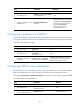
To configure route summarization:
Ste
p
Command
Remarks
1. Enter system view. system-view N/A
2. Enter OSPFv3 view.
ospfv3 [ process-id | vpn-instance
vpn-instance-name ] *
N/A
3. Enter OSPFv3 area view.
area area-id N/A
4. Configure route
summarization.
abr-summary ipv6-address prefix-length
[ not-advertise ] [ cost value ]
By default, route summarization is
not configured.
The abr-summary command takes
effect only on ABRs.
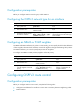
Configuring OSPFv3 received route filtering
According to some rules, you can configure OSPFv3 to filter routes calculated using received LSAs.
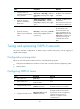
To configure OSPFv3 to filter routes calculated using received LSAs:
Ste
p
Command
Remarks
1. Enter system view. system-view N/A
2. Enter OSPFv3 view.
ospfv3 [ process-id | vpn-instance
vpn-instance-name ] *
N/A
3. Configure OSPFv3 to
filter routes calculated
using received LSAs.
filter-policy { acl6-number [ gateway
prefix-list-name ] | prefix-list
prefix-list-name [ gateway
prefix-list-name ] | gateway
prefix-list-name | route-policy
route-policy-name } import
By default, OSPFv3 accepts all
routes calculated using received
LSAs.
This command can only filter routes
computed by OSPFv3. Only routes
not filtered out can be added into
the local routing table.
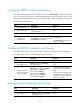
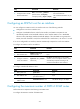
Configuring Inter-Area-Prefix LSA filtering
Ste
p
Command
Remarks
1. Enter system view. system-view N/A
2. Enter OSPFv3 view.
ospfv3 [ process-id | vpn-instance
vpn-instance-name ] *
N/A