
R21xx-HP FlexFabric 11900 Layer 3 IP Routing Configuration Guide

315
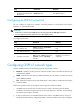
Ste
p
Command
Remarks
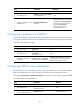
3. Configure OSPFv3 to filter
Inter-Area-Prefix-LSAs.
filter { acl6-number | prefix-list
prefix-list-name | route-policy
route-policy-name } { export | import }
By default, OSPFv3 accepts all
Inter-Area-Prefix-LSAs.
This command takes effect only on
ABRs.
Configuring an OSPFv3 cost for an interface
You can configure an OSPFv3 cost for an interface with one of the following methods:
• Configure the cost value in interface view.
• Configure a bandwidth reference value for the interface, and OSPFv3 computes the cost
automatically based on the bandwidth reference value: Interface OSPFv3 cost = Bandwidth
reference value (100 Mbps)/Interface bandwidth (Mbps). If the calculated cost is greater than
65535, the value of 65535 is used; if the calculated cost is smaller than 1, the value of 1 is used.
If no cost is configured for an interface, OSPFv3 automatically computes the cost for the interface.
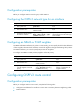
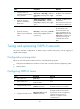
To configure an OSPFv3 cost for an interface:
Ste
p
Command
Remarks
1. Enter system view. system-view N/A
2. Enter interface view.
interface interface-type
interface-number
N/A
3. Configure an OSPFv3
cost for the interface.
ospfv3 cost value [ instance
instance-id ]
By default, the OSPF cost is 1 for a VLAN
interface, is 0 for a loopback interface, and is
automatically computed according to the
interface bandwidth for other interfaces.
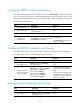
To configure a bandwidth reference value:
Ste
p
Command
Remarks
1. Enter system view. system-view N/A
2. Enter OSPFv3 view.
ospfv3 [ process-id | vpn-instance
vpn-instance-name ] *
N/A
3. Configure a bandwidth
reference value.
bandwidth-reference value
The default setting is 100 Mbps.
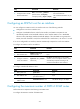
Configuring the maximum number of OSPFv3 ECMP routes
Perform this task to implement load sharing over ECMP routes.
To configure the maximum number of ECMP routes: