
R21xx-HP FlexFabric 11900 Layer 3 IP Routing Configuration Guide

316
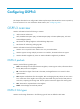
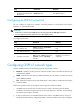
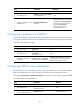
Ste
p
Command
Remarks
1. Enter system view. system-view N/A
2. Enter OSPFv3 view.
ospfv3 [ process-id | vpn-instance
vpn-instance-name ] *
N/A
3. Specify the maximum number
of ECMP routes.
maximum load-balancing
maximum
By default, the maximum number
of ECMP routes is the same as that
configured in the max-ecmp-num
command. For more information
about the max-ecmp-num
command, see IP Routing
Command Reference.
Configuring a preference for OSPFv3
A router can run multiple routing protocols. The system assigns a priority for each protocol. When these
routing protocols find the same route, the route found by the protocol with the highest priority is selected.
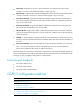
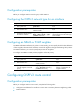
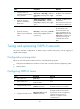
To configure a preference for OSPFv3:
Ste
p
Command
Remarks
1. Enter system view. system-view N/A
2. Enter OSPFv3 view.
ospfv3 [ process-id |
vpn-instance
vpn-instance-name ] *
N/A
3. Configure a preference
for OSPFv3.
preference [ ase ] [ route-policy
route-policy-name ] preference
By default, the preference of OSPFv3
internal routes is 10, and the priority of
OSPFv3 external routes is 150.
Configuring OSPFv3 route redistribution
Because OSPFv3 is a link state routing protocol, it cannot directly filter LSAs to be advertised. OSPFv3
filters only redistributed routes. Only routes that are not filtered out can be advertised in LSAs.
Executing the import-route or default-route-advertise command on a router makes it become an ASBR.
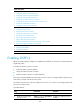
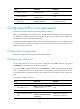
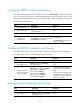
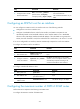
To configure OSPFv3 route redistribution:
Ste
p
Command
Remarks
1. Enter system view.
system-view N/A
2. Enter OSPFv3 view.
ospfv3 [ process-id | vpn-instance
vpn-instance-name ] *
N/A
3. (Optional.) Specify a default
cost for redistributed routes.
default cost value The default setting is 1.