
R21xx-HP FlexFabric 11900 Layer 3 IP Routing Configuration Guide


318
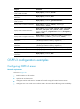
Ste
p
Command
Remarks
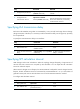
5. Configure the poll interval.
ospfv3 timer poll seconds
[ instance instance-id ]
By default, the poll interval is 120
seconds.
6. Configure the LSA
retransmission interval.
ospfv3 timer retransmit
interval [ instance instance-id ]
The default setting is 5 seconds.
The LSA retransmission interval cannot
be too short. Otherwise, unnecessary
retransmissions will occur.
Specifying LSA transmission delay
Each LSA in the LSDB has an age that is incremented by 1 every second, but the age does not change
during transmission. Therefore, it is necessary to add a transmission delay into the age time, especially
for low-speed links.
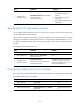
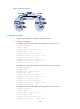
To specify the LSA transmission delay on an interface:
Ste
p
Command
Remarks
1. Enter system view.
system-view N/A
2. Enter interface view.
interface interface-type
interface-number
N/A
3. Specify the LSA transmission
delay.
ospf trans-delay seconds [ instance
instance-id ]
By default, the LSA transmission
delay is 1 second.
Specifying SPF calculation interval
LSDB changes result in SPF calculations. When the topology changes frequently, a large amount of
network and router resources are occupied by SPF calculation. You can adjust the SPF calculation
interval to reduce the impact.
When network changes are not frequent, the minimum-interval is adopted. If network changes become
frequent, the SPF calculation interval is incremented by incremental-interval × 2
n-2
(n is the number of
generation times) each time an SPF calculation occurs until the maximum-interval is reached.
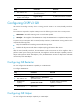
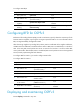
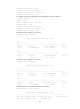
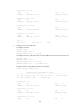
To configure SPF calculation interval:
Ste
p
Command
Remarks
1. Enter system view. system-view N/A
2. Enter OSPFv3 view.
ospfv3 [ process-id | vpn-instance
vpn-instance-name ] *
N/A