
R21xx-HP FlexFabric 11900 Layer 3 IP Routing Configuration Guide

22
• RFC 2453, RIP Version 2
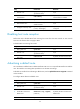
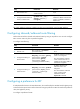
RIP configuration task list
Tasks at a
g
lance
Configuring basic RIP:
• (Required.) Enabling RIP
• (Optional.) Controlling RIP reception and advertisement on interfaces
• (Optional.) Configuring a RIP version
(Optional.) Configuring RIP route control:
• Configuring an additional routing metric
• Configuring RIPv2 route summarization
• Disabling host route reception
• Advertising a default route
• Configuring inbound/outbound route filtering
• Configuring a preference for RIP
• Configuring RIP route redistribution
(Optional.) Tuning and optimizing RIP networks:
• Configuring RIP timers
• Configuring split horizon and poison reverse
• Configuring the maximum number of ECMP routes
• Enabling zero field check on incoming RIPv1 messages
• Enabling source IP address check on incoming RIP updates
• Configuring RIPv2 message authentication
• Configuring the RIP packet sending rate
(Optional.) Configuring RIP GR
(Optional.) Configuring BFD for RIP
(Optional.) Configuring RIP FRR
Configuring basic RIP
Before you configure basic RIP settings, complete the following tasks:
• Configure the link layer protocol.
• Configure IP addresses for interfaces to ensure IP connectivity between neighboring routers.
Enabling RIP
Perform this task to create a RIP process and enable the RIP process on the interface attached to the
specified network. An interface that is not on the specified network does not run RIP.
To enable multiple RIP processes on a router, you must specify an ID for each process. A RIP process ID
has only local significance. Two RIP routers having different process IDs can also exchange RIP packets.