
R21xx-HP FlexFabric 11900 Layer 3 IP Routing Configuration Guide


340
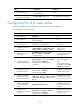
Ste
p
Command
Remarks
11. Configure route
advertisement from Level-1
to Level-2.
ipv6 import-route isisv6 level-1 into level-2
[ filter-policy { acl6-number | prefix-list
prefix-list-name | route-policy
route-policy-name } | tag tag ] *
By default, IPv6 IS-IS
advertises routes from
Level-1 to Level-2.
12. Specify the maximum
number of ECMP routes for
load balancing.
ipv6 maximum load-balancing number
By default, the maximum
number of ECMP routes is
the same as that configured
in the max-ecmp-num
command. For more
information about the
max-ecmp-num command,
see IP Routing Command
Reference.
Configuring BFD for IPv6 IS-IS
Bidirectional forwarding detection (BFD) can quickly detect faults between IPv6 IS-IS neighbors to
improve the convergence speed of IPv6 IS-IS. For more information about BFD, see High Availability
Configuration Guide.
To configure BFD for IPv6 IS-IS:
Ste
p
Command
Remarks
1. Enter system view. system-view N/A
2. Enable an IS-IS process and
enter IS-IS view.
isis [ process-id ] [ vpn-instance
vpn-instance-name ]
N/A
3. Configure the NET for the IS-IS
process.
network-entity net By default, no NET is configured.
4. Enable IPv6 for the IS-IS
process.
ipv6 enable
By default, IPv6 for the IS-IS
process is disabled.
5. Return to system view. quit N/A
6. Enter interface view.
interface interface-type
interface-number
N/A
7. Enable IPv6 for an IS-IS
process.
isis ipv6 enable [ process-id ]
By default, IPv6 is disabled for an
IS-IS process.
8. Enable BFD for IPv6 IS-IS. isis ipv6 bfd enable
By default, BFD for IPv6 IS-IS is
disabled.
Displaying and maintaining IPv6 IS-IS
Execute display commands in any view. For other display and reset commands, see "Configuring IS-IS."