
R21xx-HP FlexFabric 11900 Layer 3 IP Routing Configuration Guide


341
Task Command
Display information about routes
redistributed by IPv6 IS-IS.
display isis redistribute ipv6 [ ipv6-address mask-length ]
[ level-1 | level-2 ] [ process-id ]
Display IPv6 IS-IS routing information.
display isis route ipv6 [ ipv6-address ] [ [ level-1 | level-2 ] |
verbose ] * [ process-id ]
IPv6 IS-IS configuration examples
IPv6 IS-IS basic configuration example
Network requirements
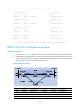
As shown in Figure 81, Switch A, Switch B, Switch C, and Switch D, all enabled with IPv6, reside in the
same AS. Configure IPv6 IS-IS on the switches so that they can reach each other.
Switch A and Switch B are Level-1 switches, Switch D is a Level-2 switch, and Switch C is a Level-1-2 switch.
Figure 81 Network diagram
Configuration procedure
1. Configure IPv6 addresses for interfaces. (Details not shown.)
2. Configure IPv6 IS-IS:
# Configure Switch A.
<SwitchA> system-view
[SwitchA] isis 1
[SwitchA-isis-1] is-level level-1
[SwitchA-isis-1] network-entity 10.0000.0000.0001.00
[SwitchA-isis-1] ipv6 enable
[SwitchA-isis-1] quit
[SwitchA] interface vlan-interface 100
[SwitchA-Vlan-interface100] isis ipv6 enable 1
[SwitchA-Vlan-interface100] quit