
R21xx-HP FlexFabric 11900 Layer 3 IP Routing Configuration Guide

23
If you configure RIP settings in interface view before enabling RIP, the settings do not take effect until RIP
is enabled. If a physical interface is attached to multiple networks, you cannot advertise these networks
in different RIP processes.
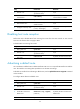
To enable RIP:
Ste
p
Command
Remarks
1. Enter system view. system-view N/A
2. Create a RIP process and
enter RIP view.
rip [ process-id ] [ vpn-instance
vpn-instance-name ]
By default, no RIP process is
enabled.
3. Enable the RIP process on the
interface attached to the
specified network.
network network-address
By default, RIP is disabled on an
interface.
The network 0.0.0.0 command
can enable RIP on all interfaces in
a single process, but does not
apply to multiple RIP processes.
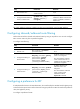
Controlling RIP reception and advertisement on interfaces
Ste
p
Command
Remarks
1. Enter system view.
system-view N/A
2. Enter RIP view.
rip [ process-id ] [ vpn-instance
vpn-instance-name ]
N/A
3. Disable a specified interface
from sending RIP messages.
silent-interface { interface-type
interface-number | all }
By default, all RIP-enabled
interfaces can send RIP messages.
The disabled interface can still
receive RIP messages and respond
to unicast requests containing
unknown ports.
4. Return to system view.
quit N/A
5. Enter interface view.
interface interface-type
interface-number
N/A
6. Enable an interface to receive
RIP messages.
rip input
By default, a RIP-enabled interface
can receive RIP messages.
7. Enable an interface to send
RIP messages.
rip output
By default, a RIP-enabled interface
can send RIP messages.
Configuring a RIP version
You can configure a global RIP version in RIP view or an interface-specific RIP version in interface view.
An interface preferentially uses the interface-specific RIP version. If no interface-specific version is
specified, the interface uses the global RIP version. If neither global nor interface-specific RIP version is