
R21xx-HP FlexFabric 11900 Layer 3 IP Routing Configuration Guide



359
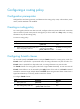
Configuring a routing policy
Configuration prerequisites
Configure filters and routing protocols, and determine the routing policy name, node numbers, match
criteria, and the attributes to be modified.
Creating a routing policy
For a routing policy that has more than one node, configure at least one permit-mode node. A route that
does not match any node cannot pass the routing policy. If all the nodes are in deny mode, no routing
information can pass the routing policy.
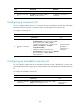
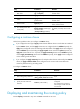
To create a routing policy:
Ste
p
Command
Remarks
1. Enter system view.
system-view N/A
2. Create a routing policy and a node, and
enter routing policy node view.
route-policy
route-policy-name { deny |
permit } node node-number
By default, no routing policy
is created.
Configuring if-match clauses
You can either specify no if-match clauses or multiple if-match clauses for a routing policy node. If no
if-match clause is specified for a permit-mode node, all routing information can pass the node. If no
if-match clause is specified for a deny-mode node, no routing information can pass the node.
The if-match clauses of a routing policy node have a logical AND relationship. A route must meet all
if-match clauses before it can be executed by the apply clauses of the node. If an if-match command
exceeds the maximum length, multiple identical if-match clauses are generated. These clauses have a
logical OR relationship. A route only needs to match one of them.
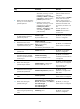
To configure if-match clauses:
Ste
p
Command
Remarks
1. Enter system view.
system-view N/A
2. Enter routing policy node view.
route-policy route-policy-name { deny
| permit } node node-number
N/A