
R21xx-HP FlexFabric 11900 Layer 3 IP Routing Configuration Guide

27
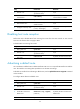
Ste
p
Command
Remarks
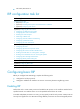
5. Enter interface view.
interface interface-type
interface-number
N/A
6. Configure the RIP interface to
advertise a default route.
rip default-route { { only |
originate } [ cost cost ] |
no-originate }
By default, a RIP interface can
advertise a default route if the RIP
process is enabled to advertise a
default route.
NOTE:
The router enabled to advertise a default route does not accept default routes from RIP neighbors.
Configuring inbound/outbound route filtering
Perform this task to filter inbound and outbound routes by using an IP prefix list. You can also configure
RIP to receive routes only from a specified neighbor.
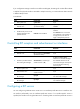
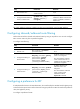
To configure route filtering:
Ste
p
Command
Remarks
1. Enter system view. system-view N/A
2. Enter RIP view.
rip [ process-id ] [ vpn-instance
vpn-instance-name ]
N/A
3. Configure the filtering of
inbound routes.
filter-policy { acl-number | gateway
prefix-list-name | prefix-list
prefix-list-name [ gateway
prefix-list-name ] } import
[ interface-type interface-number ]
By default, the filtering of inbound
routes is not configured.
This command filters inbound
routes. Filtered routes are not
installed into the routing table or
advertised to neighbors.
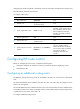
4. Configure the filtering of
outbound routes.
filter-policy { acl-number | prefix-list
prefix-list-name } export [ protocol
[ process-id ] | interface-type
interface-number ]
By default, the filtering of
outbound routes is not
configured.
This command filters outbound
routes, including routes
redistributed with the
import-route command.
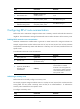
Configuring a preference for RIP
If multiple IGPs find routes to the same destination, the route found by the IGP that has the highest priority
is selected as the optimal route. Perform this task to assign a preference to RIP. The smaller the preference
value, the higher the priority.
To configure a preference for RIP: