
R21xx-HP FlexFabric 11900 Layer 3 IP Routing Configuration Guide


31
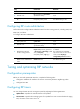
Ste
p
Command
Remarks
2. Enter RIP view.
rip [ process-id ] [ vpn-instance
vpn-instance-name ]
N/A
3. Enable zero field check on
incoming RIPv1 messages.
checkzero The default setting is enabled.
Enabling source IP address check on incoming RIP updates
Perform this task to enable source IP address check on incoming RIP updates.
Upon receiving a message on an Ethernet interface, RIP compares the source IP address of the message
with the IP address of the interface. If they are not in the same network segment, RIP discards the
message.
Upon receiving a message on a serial interface, RIP checks whether the source address of the message
is the IP address of the peer interface. If not, RIP discards the message.
To enable source IP address check on incoming RIP updates:
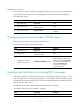
Ste
p
Command
Remarks
1. Enter system view. system-view N/A
2. Enter RIP view.
rip [ process-id ] [ vpn-instance
vpn-instance-name ]
N/A
3. Enable source IP address
check on incoming RIP
messages.
validate-source-address By default, this function is enabled.
Configuring RIPv2 message authentication
Perform this task to enable authentication on RIPv2 messages. This feature does not apply to RIPv1
because RIPv1 does not support authentication. Although you can specify an authentication mode for
RIPv1 in interface view, the configuration does not take effect.
RIPv2 supports two authentication modes: simple authentication and MD5 authentication.
To configure RIPv2 message authentication:
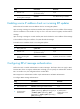
Ste
p
Command
Remarks
1. Enter system view.
system-view
N/A
2. Enter interface view.
interface interface-type interface-number N/A
3. Configure RIPv2
authentication.
rip authentication-mode
{
md5 { rfc2082
{
cipher
cipher-string | plain plain-string
}
key-id
| rfc2453
{
cipher
cipher-string | plain
plain-string
}
} | simple
{
cipher
cipher-string |
plain plain-string
}
}
By default, RIPv2
authentication is not
configured.