
R21xx-HP FlexFabric 11900 Layer 3 IP Routing Configuration Guide


33
Configuring BFD for RIP
RIP detects route failures by periodically sending requests. If it receives no response for a route within a
certain time, RIP considers the route unreachable. This detection mechanism is not fast enough. To speed
up convergence, perform this task to enable BFD for RIP. For more information about BFD, see High
Availability Configuration Guide.
BFD provides only single-hop echo detection mode for directly connected RIP neighbors. In this mode, a
BFD session is established only when the neighbor has route information to send.
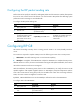
To enable BFD for RIP (single-hop echo detection):
Ste
p
Command
Remarks
1. Enter system view.
system-view N/A
2. Configure the source IP
address of BFD echo packets.
bfd echo-source-ip ip-address
By default, the source IP address of
BFD echo packets is not
configured.
3. Enter interface view.
interface interface-type
interface-number
N/A
4. Enable BFD for RIP.
rip bfd enable By default, BFD for RIP is disabled.
Configuring RIP FRR
A link or router failure on a path can cause packet loss and even routing loop until RIP completes routing
convergence based on the new network topology. FRR enables fast rerouting to minimize the impact of
link or node failures.
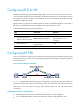
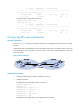
Figure 6 Network diagram for RIP FRR
In Figure 6, configure FRR on Router B by using a routing policy to specify a backup next hop. When the
primary link fails, RIP directs packets to the backup next hop. At the same time, RIP calculates the shortest
path based on the new network topology, and forwards packets over that path after network
convergence.
Configuration restrictions and guidelines
• RIP FRR takes effect only for RIP routes learned from directly connected neighbors.
• Do not use RIP FRR and BFD for RIP at the same time. Otherwise, FRR might fail to work.