
R21xx-HP FlexFabric 11900 Layer 3 IP Routing Configuration Guide


34
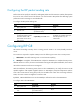
• RIP FRR is available only when the state of primary link (with Layer 3 interfaces staying up) changes
from bidirectional to unidirectional or when the primary link fails. A unidirectional link refers to the
link through which packets are forwarded only from one end to the other.
Configuration prerequisites
You must specify a next hop by using the apply fast-reroute backup-interface command in a routing
policy and reference the routing policy for FRR. For more information about routing policy configuration,
see "Configuring routing policies."
Configuration procedure
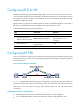
To configure RIP FRR:
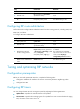
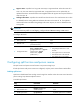
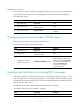
Ste
p
Command
Remarks
1. Enter system view.
system-view N/A
2. Configure the source address
of echo packets.
bfd echo-source-ip ip-address
By default, the source address of
echo packets is not configured.
3. Enter RIP view.
rip [ process-id ] [ vpn-instance
vpn-instance-name ]
N/A
4. Configure RIP FRR.
fast-reroute route-policy
route-policy-name
By default, RIP FRR is disabled.
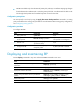
Displaying and maintaining RIP
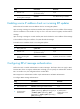
Execute display commands in any view and execute reset commands in user view.
Task Command
Display RIP current status and configuration
information.
display rip [ process-id ]
Display all active routes in RIP database. display rip process-id database
Display RIP interface information.
display rip process-id interface [ interface-type
interface-number ]
Display routing information about a specified RIP
process.
display rip process-id route [ ip-address { mask |
mask-length } | peer ip-address | statistics ]
Reset a RIP process. reset rip process-id process
Clear the statistics of a RIP process. reset rip process-id statistics