
R21xx-HP FlexFabric 11900 Layer 3 IP Routing Configuration Guide

61
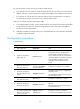
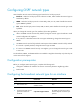
To configure a totally NSSA area, configure the nssa command on all the routers attached to the area
and configure the nssa no-summary command on the ABR. The ABR of a totally NSSA area does not
advertise inter-area routes into the area.
To configure an NSSA area:
Ste
p
Command
Remarks
1. Enter system view. system-view N/A
2. Enter OSPF view.
ospf [ process-id | router-id
router-id | vpn-instance
vpn-instance-name ] *
N/A
3. Enter area view. area area-id
N/A
4. Configure the area as an
NSSA area.
nssa [ default-route-advertise |
no-import-route | no-summary |
translate-always |
translator-stability-interval value ]
*
By default, no area is configured as
an NSSA area.
5. (Optional.) Specify a cost for
the default route advertised
to the NSSA area.
default-cost cost
The default setting is 1.
This command takes effect only on
the ABR/ASBR of an NSSA or totally
NSSA area.
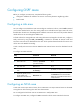
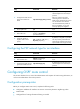
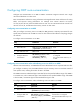
Configuring a virtual link
Virtual links are configured for connecting backbone area routers that have no direct physical links.
Virtual links cannot transit a stub area, totally stub area, NSSA area, or totally NSSA area.
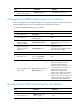
To configure a virtual link:
Ste
p
Command
Remarks
1. Enter system view.
system-view N/A
2. Enter OSPF view.
ospf [ process-id | router-id
router-id | vpn-instance
vpn-instance-name ] *
N/A
3. Enter area view.
area area-id
N/A
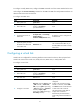
4. Configure a virtual link.
vlink-peer router-id [ dead seconds
| hello seconds | { hmac-md5 |
md5 } key-id { cipher cipher-string
| plain plain-string } | retransmit
seconds | simple { cipher
cipher-string | plain plain-string } |
trans-delay seconds ] *
By default, no virtual link is
configured.
Configure this command on both
ends of a virtual link, and the hello
and dead intervals must be identical
on both ends of the virtual link.
The authentication mode (MD5 or
simple) of the virtual link is
determined by the authentication
mode configured for the backbone
area.