
R21xx-HP FlexFabric 11900 Layer 3 IP Routing Configuration Guide

66
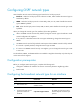
Configuring inbound OSPF route filtering
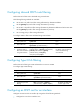
Perform this task to filter routes calculated using received LSAs.
The following filtering methods are available:
• Use an ACL or IP prefix list to filter routing information by destination address.
• Use the gateway keyword to filter routing information by next hop.
• Use an ACL or IP prefix list to filter routing information by destination address and at the same time
use the gateway keyword to filter routing information by next hop.
• Use a routing policy to filter routing information.
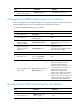
To configure OSPF to filter routes calculated using received LSAs:
Ste
p
Command
Remarks
1. Enter system view.
system-view N/A
2. Enter OSPF view.
ospf [ process-id | router-id router-id |
vpn-instance vpn-instance-name ] *
N/A
3. Configure OSPF to
filter routes calculated
using received LSAs.
filter-policy { acl-number [ gateway
prefix-list-name ] | gateway prefix-list-name |
prefix-list prefix-list-name [ gateway
prefix-list-name ] | route-policy
route-policy-name } import
By default, OSPF accepts all
routes calculated using
received LSAs.
Configuring Type-3 LSA filtering
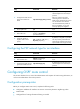
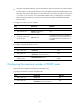
Perform this task to filter Type-3 LSAs advertised to an area on an ABR.
To configure Type-3 LSA filtering:
Ste
p
Command
Remarks
1. Enter system view.
system-view N/A
2. Enter OSPF view.
ospf [ process-id | router-id router-id |
vpn-instance vpn-instance-name ] *
N/A
3. Enter area view. area area-id N/A
4. Configure Type-3 LSA
filtering.
filter { acl-number | prefix-list
prefix-list-name } { import | export }
By default, the ABR does
not filter Type-3 LSAs.
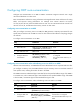
Configuring an OSPF cost for an interface
Configure an OSPF cost for an interface by using either of the following methods:
• Configure the cost value in interface view.