
R21xx-HP FlexFabric 11900 Layer 3 IP Routing Configuration Guide
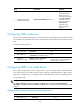

69
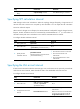
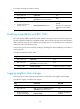
Ste
p
Command
Remarks
2. Enter OSPF view.
ospf [ process-id | router-id router-id |
vpn-instance vpn-instance-name ] *
N/A
3. Configure OSPF to
redistribute routes from
another routing protocol.
import-route protocol [ process-id |
all-processes | allow-ibgp ] [ cost cost |
route-policy route-policy-name | tag tag
| type type ] *
By default, no route redistribution
is configured.
This command redistributes only
active routes. To view information
about active routes, use the
display ip routing-table protocol
command.
4. (Optional.) Configure
OSPF to filter redistributed
routes.
filter-policy { acl-number | prefix-list
prefix-list-name } export [ protocol
[ process-id ] ]
By default, OSPF accepts all
redistributed routes.
Configuring OSPF to redistribute a default route
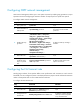
The import-route command cannot redistribute a default external route. Perform this task to redistribute a
default route.
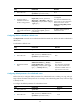
To redistribute a default route:
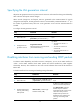
Ste
p
Command
Remarks
1. Enter system view.
system-view N/A
2. Enter OSPF view.
ospf [ process-id | router-id router-id |
vpn-instance vpn-instance-name ] *
N/A
3. Redistribute a default
route.
default-route-advertise [ [ [ always |
permit-calculate-other ] | cost cost |
route-policy route-policy-name | type
type ] * | summary cost cost ]
By default, no default route is
redistributed.
This command is applicable
only to VPNs. The PE router
advertises a default route in a
Type-3 LSA to a CE router.
Configuring default parameters for redistributed routes
Perform this task to configure default parameters for redistributed routes, including cost, tag, and type.
Tags indicate information about protocols. For example, when redistributing BGP routes, OSPF uses tags
to identify AS IDs.
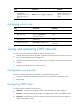
To configure the default parameters for redistributed routes:
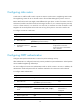
Ste
p
Command
Remarks
1. Enter system view. system-view N/A
2. Enter OSPF view.
ospf [ process-id | router-id router-id |
vpn-instance vpn-instance-name ] *
N/A