
R21xx-HP FlexFabric 11900 Layer 3 IP Routing Configuration Guide

70
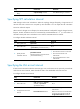
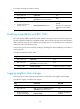
Ste
p
Command
Remarks
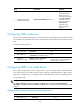
3. Configure the default
parameters for
redistributed routes (cost,
upper limit, tag, and
type).
default { cost cost | tag tag | type type } *
By default, the cost is 1, the
tag is 1, and the type is
Type-2.
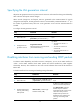
Advertising a host route
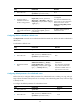
Ste
p
Command
Remarks
1. Enter system view.
system-view N/A
2. Enter OSPF view.
ospf [ process-id | router-id
router-id | vpn-instance
vpn-instance-name ] *
N/A
3. Enter area view.
area area-id
N/A
4. Advertise a host route.
host-advertise ip-address cost
By default, no host route is
advertised.
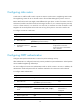
Tuning and optimizing OSPF networks
You can use one of the following methods to optimize an OSPF network:
• Change OSPF packet timers to adjust the convergence speed and network load. On low-speed
links, consider the delay time for sending LSAs.
• Change the SPF calculation interval to reduce resource consumption caused by frequent network
changes.
• Configure OSPF authentication to improve security.
Configuration prerequisites
Before you configure OSPF network optimization, complete the following tasks:
• Configure IP addresses for interfaces to ensure IP connectivity between neighboring nodes.
• Enable OSPF.
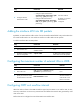
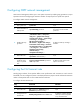
Configuring OSPF timers
An OSPF interface includes the following timers:
• Hello timer—Interval for sending hello packets. It must be identical on OSPF neighbors.
• Poll timer—Interval for sending hello packets to a neighbor that is down on the NBMA network.
• Dead timer—Interval within which if the interface receives no hello packet from the neighbor, it
declares the neighbor is down.