
R21xx-HP FlexFabric 11900 Layer 3 IP Routing Configuration Guide

73
Specifying the LSA generation interval
Adjust the LSA generation interval to protect network resources and routers from being overwhelmed by
LSAs at the time of frequent network changes.
When network changes are not frequent, LSAs are generated at the minimum-interval. If network
changes become frequent, the LSA generation interval is incremented by incremental-interval × 2
n-2
(n is
the number of generation times) each time a LSA generation occurs until the maximum-interval is
reached.
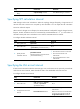
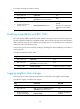
To configure the LSA generation interval:
Ste
p
Command
Remarks
1. Enter system view.
system-view N/A
2. Enter OSPF view.
ospf [ process-id | router-id router-id |
vpn-instance vpn-instance-name ] *
N/A
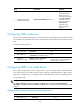
3. Configure the LSA
generation interval.
lsa-generation-interval
maximum-interval [ minimum-interval
[ incremental-interval ] ]
By default:
• The maximum interval is 5
seconds.
• The minimum interval is 0
milliseconds.
• The incremental interval is 0
milliseconds.
Disabling interfaces from receiving and sending OSPF packets
To enhance OSPF adaptability and reduce resource consumption, you can set an OSPF interface to
"silent." A silent OSPF interface blocks OSPF packets and cannot establish any OSPF neighbor
relationship. However, other interfaces on the router can still advertise direct routes of the interface in
Router LSAs.
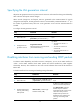
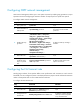
To disable interfaces from receiving and sending routing information:
Ste
p
Command
Remarks
1. Enter system view.
system-view N/A
2. Enter OSPF view.
ospf [ process-id | router-id router-id
| vpn-instance vpn-instance-name ] *
N/A
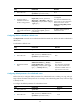
3. Disable interfaces from
receiving and sending
OSPF packets.
silent-interface { interface-type
interface-number | all }
By default, an OSPF interface can
receive and send OSPF packets.
The silent-interface command
disables only the interfaces
associated with the current process
rather than other processes.
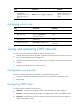
Multiple OSPF processes can
disable the same interface from
receiving and sending OSPF
packets.