
R21xx-HP FlexFabric 11900 Layer 3 IP Routing Configuration Guide

74
Configuring stub routers
A stub router is used for traffic control. It reports its status as a stub router to neighboring OSPF routers.
The neighboring routers do not use the stub router to forward data although they have a route to it.
Router LSAs from the stub router might contain different link type values. A value of 3 means a link to a
stub network, and the cost of the link will not be changed. A value of 1, 2 or 4 means a point-to-point link,
a link to a transit network, or a virtual link. On such links, a maximum cost value of 65535 is used.
Neighbors do not send packets to the stub router as long as they have a route with a smaller cost.
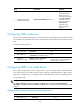
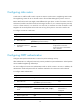
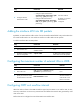
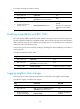
To configure a router as a stub router:
Ste
p
Command
Remarks
1. Enter system view.
system-view N/A
2. Enter OSPF view.
ospf [ process-id | router-id router-id |
vpn-instance vpn-instance-name ] *
N/A
3. Configure the router as a
stub router.
stub-router
By default, the router is not
configured as a stub router.
A stub router has no associations
with a stub area.
Configuring OSPF authentication
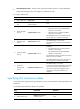
Configure OSPF packet authentication to ensure the packet exchange security.
After authentication is configured, OSPF only receives packets that pass authentication. Failed packets
cannot establish neighboring relationships.
You must configure the same area authentication mode on all the routers in an area. In addition, the
authentication mode and password for all interfaces attached to the same area must be identical.
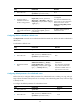
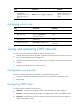
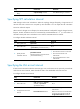
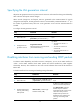
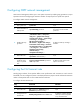
To configure OSPF authentication:
Ste
p
Command
Remarks
1. Enter system view.
system-view N/A
2. Enter OSPF view.
ospf [ process-id | router-id router-id |
vpn-instance vpn-instance-name ] *
N/A
3. Enter area view.
area area-id N/A
4. Configure area authentication
mode.
authentication-mode { md5 | simple }
By default, no
authentication is
configured.
5. Return to OSPF view.
quit N/A
6. Return to system view. quit N/A
7. Enter interface view.
interface interface-type interface-number N/A