
R21xx-HP FlexFabric 11900 Layer 3 IP Routing Configuration Guide

77
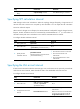
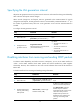
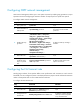
Configuring OSPF network management
OSPF network management allows you to save system resources by enabling trap generation to report
important events and configuring the maximum number of output traps for a specific time period.
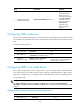
To configure OSPF network management:
Ste
p
Command
Remarks
1. Enter system view.
system-view N/A
2. Bind OSPF MIB to an
OSPF process.
ospf mib-binding process-id
By default, OSPF MIB is bound to
the process with the smallest
process ID.
3. Enable OSPF trap
generation.
snmp-agent trap enable ospf
[ authentication-failure | bad-packet |
config-error | grhelper-status-change |
grrestarter-status-change | if-state-change
| lsa-maxage | lsa-originate |
lsdb-approaching-overflow |
lsdb-overflow | neighbor-state-change |
nssatranslator-status-change | retransmit |
virt-authentication-failure | virt-bad-packet
| virt-config-error | virt-retransmit |
virtgrhelper-status-change |
virtif-state-change |
virtneighbor-state-change ] *
By default, OSPF trap sending is
enabled.
4. Enter OSPF view.
ospf [ process-id | router-id router-id |
vpn-instance instance-name ] *
N/A
5. Configure the
number of output
traps in a specific
time.
snmp trap rate-limit interval trap-interval
count trap-number
By default, OSPF outputs seven
traps in 10 seconds.
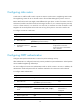
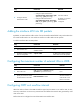
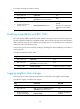
Configuring the LSU transmit rate
Sending large numbers of LSU packets affects router performance and consumes too much network
bandwidth. You can configure the router to send LSU packets at a proper interval and limit the maximum
number of LSU packets sent out of an OSPF interface each time.
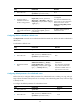
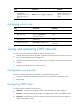
To configure the LSU transmit rate:
Ste
p
Command
Remarks
1. Enter system view. system-view N/A
2. Enter OSPF view.
ospf [ process-id | router-id router-id |
vpn-instance vpn-instance-name ] *
N/A
3. Configure the LSU
transmit rate.
transmit-pacing interval interval count count
By default, an OSPF interface
sends up to three LSU packets
every 20 milliseconds.