
R21xx-HP FlexFabric 11900 Layer 3 IP Services Command Reference





176
chassis chassis-number slot slot-number: Displays IPv6 and ICMPv6 packet statistics for the specified
card on the specified IRF member device. The chassis-number argument specifies the ID of the IRF
member device. The slot-number argument specifies the number of the slot that holds the card. (In IRF
mode.)
Usage guidelines
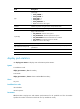
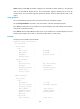
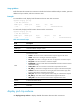
This command displays statistics about received and sent IPv6 and ICMPv6 packets.
Use the reset ipv6 statistics command to clear the statistics of all IPv6 and ICMPv6 packets.
If the slot slot-number option is not specified, this command displays IPv6 and ICMPv6 packet statistics
of all cards. (In standalone mode.)
If the chassis chassis-number slot slot-number option is not specified, this command displays IPv6 and
ICMPv6 packet statistics of all cards on all the IRF member devices. (In IRF mode.)
Examples
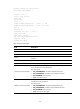
# Display IPv6 and ICMPv6 packet statistics.
<Sysname> display ipv6 statistics
IPv6 statistics:
Sent packets:
Total: 0
Sent locally: 0 Forwarded: 0
Raw packets: 0 Discarded: 0
Fragments: 0 Fragments failed: 0
Routing failed: 0
Received packets:
Total: 0
Received locally: 0 Hop limit exceeded: 0
Fragments: 0 Reassembled: 0
Reassembly failures: 0 Reassembly timeout: 0
Format errors: 0 Option errors: 0
Protocol errors: 0
ICMPv6 statistics:
Sent packets:
Total: 0
Unreachable: 0 Too big: 0
Hop limit exceeded: 0 Reassembly timeouts: 0
Parameter problems: 0
Echo requests: 0 Echo replies: 0
Neighbor solicits: 0 Neighbor adverts: 0
Router solicits: 0 Router adverts: 0
Redirects: 0
Send failed:
Rate limitation: 0 Other errors: 0