
R21xx-HP FlexFabric 11900 Layer 3 IP Services Command Reference




248
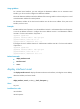
Views
Tunnel interface view
Predefined user roles
network-admin
Parameters
text: Specifies a description for the interface, a string of 1 to 80 case-sensitive characters.
Usage guidelines
Configure descriptions for different interfaces for identification and management purpose.
This command configures an interface description and has no any other function. You can use the display
interface command to view the configured interface description.
Examples
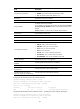
# Configure the description for the interface Tunnel 1 as tunnel1.
<Sysname> system-view
[Sysname] interface tunnel 1
[Sysname-Tunnel1] description tunnel1
Related commands
display interface tunnel
destination
Use destination to specify the destination address for a tunnel interface.
Use undo destination to remove the configured tunnel destination address.
Syntax
destination { ip-address | ipv6-address }
undo destination
Default
No tunnel destination address is configured.
Views
Tunnel interface view
Predefined user roles
network-admin
Parameters
ip-address: Specifies the tunnel destination IPv4 address.
ipv6-address: Specifies the tunnel destination IPv6 address.