
R21xx-HP FlexFabric 11900 Layer 3 IP Services Command Reference



70
Parameters
drop: Drops messages containing Option 82.
keep: Keeps the original Option 82 intact.
replace: Replaces the original Option 82 with the configured Option 82.
Usage guidelines
This command takes effect only for DHCP requests containing Option 82.
If the DHCP relay agent is enabled to support Option 82, it always adds Option 82 to a DHCP request
that does not contain Option 82 before forwarding the request to the DHCP server.
Examples
# Configure the DHCP relay agent to forward messages containing Option 82 without changing their
Option 82.
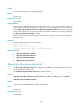
<Sysname> system-view
[Sysname] interface vlan-interface 10
[Sysname-Vlan-interface10] dhcp relay information enable
[Sysname-Vlan-interface10] dhcp relay information strategy keep
Related commands
• dhcp relay information enable
• display dhcp relay information
dhcp relay release ip
Use dhcp relay release ip to release a specific client IP address.
Syntax
dhcp relay release ip client-ip [ vpn-instance vpn-instance-name ]
Views
System view
Predefined user roles
network-admin
Parameters
client-ip: Specifies the IP address to be released.
vpn-instance vpn-instance-name: Specifies the MPLS L3VPN instance of the IP address. The
vpn-instance-name is a case-sensitive string of 1 to 31 characters. If no VPN is specified, the IP address
in the public network will be released.
Usage guidelines
After you execute this command, the relay agent sends a DHCP-RELEASE packet to the DHCP server and
removes the relay entry of the IP address. Upon receiving the packet, the server removes the binding
information for the specified IP address to release the IP address.
Examples
# Release the IP address 1.1.1.1.
<Sysname> system-view
[Sysname] dhcp relay release ip 1.1.1.1