
R21xx-HP FlexFabric 11900 Layer 3 IP Services Configuration Guide






89
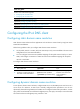
Step Command Remarks
2. Specify the source
interface for DNS
packets.
dns source-interface interface-type
interface-number [ vpn-instance
vpn-instance-name ]
By default, no source interface for
DNS packets is specified.
If you specify the vpn-instance
vpn-instance-name option, make
sure the source interface is on the
specified VPN.
Configuring the DNS trusted interface
By default, an interface obtains DNS suffix and domain name server information from DHCP. The
network attacker may act as the DHCP server to assign wrong DNS suffix and domain name server
address to the device. As a result, the device fails to get the resolved IP address or may get the wrong IP
address. With the DNS trusted interface specified, the device only uses the DNS suffix and domain name
server information obtained through the trusted interface to avoid attack.
To configure the DNS trusted interface:
Step Command Remarks
1. Enter system view.
system-view N/A
2. Specify the DNS trusted
interface.
dns trust-interface interface-type
interface-number
By default, no DNS trusted
interface is specified.
You can configure up to 128 DNS
trusted interfaces.
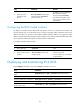
Displaying and maintaining IPv4 DNS
Execute display commands in any view and reset commands in user view.
Task Command
Display the domain name resolution
table.
display dns host [ ip | ipv6 ] [ vpn-instance vpn-instance-name ]
Display IPv4 DNS server information.
display dns server [ dynamic ] [ vpn-instance vpn-instance-name ]
Display IPv6 DNS server information.
display ipv6 dns server [ dynamic ] [ vpn-instance vpn-instance-name ]
Display DNS suffixes. display dns domain [ dynamic ] [ vpn-instance vpn-instance-name ]
Clear information about the dynamic
domain name cache.
reset dns host [ ip | ipv6 ] [ vpn-instance vpn-instance-name ]