
R21xx-HP FlexFabric 11900 Layer 3 IP Services Configuration Guide




90
IPv4 DNS configuration examples
Static domain name resolution configuration example
Network requirements
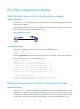
As shown in Figure 34, the device wants to access the host by using an easy-to-remember domain name
rather than an IP address.
Configure static domain name resolution on the device so that the device can use the domain name
host.com to access the host whose IP address is 10.1.1.2.
Figure 34 Network diagram
Configuration procedure
# Configure a mapping between host name host.com and IP address 10.1.1.2.
<Sysname> system-view
[Sysname] ip host host.com 10.1.1.2
# Use the ping host.com command to verify that the device can use static domain name resolution to
resolve domain name host.com into IP address 10.1.1.2.
[Sysname] ping host.com
PING host.com (10.1.1.2): 56 data bytes
56 bytes from 10.1.1.2: icmp_seq=0 ttl=255 time=1.000 ms
56 bytes from 10.1.1.2: icmp_seq=1 ttl=255 time=1.000 ms
56 bytes from 10.1.1.2: icmp_seq=2 ttl=255 time=1.000 ms
56 bytes from 10.1.1.2: icmp_seq=3 ttl=255 time=1.000 ms
56 bytes from 10.1.1.2: icmp_seq=4 ttl=255 time=2.000 ms
--- host.com ping statistics ---
5 packet(s) transmitted, 5 packet(s) received, 0.0% packet loss
round-trip min/avg/max/stddev = 1.000/1.200/2.000/0.400 ms
Dynamic domain name resolution configuration example
Network requirements
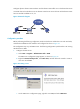
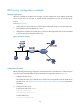
As shown in Figure 35, the device wants to access the host by using an easy-to-remember domain name
rather than an IP address, and to request the DNS server on the network for an IP address by using
dynamic domain name resolution. The IP address of the DNS server is 2.1.1.2/16 and the DNS server has
a com domain, which stores the mapping between domain name host and IP address 3.1.1.1/16.