
R21xx-HP FlexFabric 11900 Layer 3 IP Services Configuration Guide




91
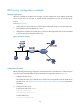
Configure dynamic domain name resolution and the domain name suffix com on the device that serves
as a DNS client so that the device can use domain name host to access the host with the domain name
host.com and the IP address 3.1.1.1/16.
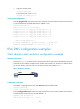
Figure 35 Network diagram
Configuration procedure
Before performing the following configuration, make sure the device and the host can reach each other,
and that the IP addresses of the interfaces are configured as shown in Figure 35.
T
his configuration may vary with DNS servers. The following configuration is performed on a PC running
Windows Server 2000.
1. Configure the DNS server:
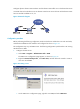
a. Select Start > Programs > Administrative Tools > DNS.
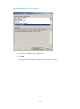
The DNS server configuration page appears, as shown in Figure 36.
b. Right-click Forward Lookup Zones, select New Zone, and then follow the wizard to create a
new zone named com.
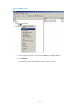
Figure 36 Creating a zone
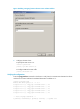
c. On the DNS server configuration page, right-click zone com, and select New Host.