
R21xx-HP FlexFabric 11900 Layer 3 IP Services Configuration Guide




94
DNS proxy configuration example
Network requirements
When the IP address of the DNS server changes, you must configure the new IP address of the DNS
server on each device on the LAN. To simplify network management, you can use the DNS proxy
function.
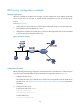
As shown in Figure 39:
• S
pecify Device A as the DNS server of Device B (the DNS client). Device A acts as a DNS proxy.
The IP address of the real DNS server is 4.1.1.1.
• Configure the IP address of the DNS proxy on Device B. DNS requests of Device B are forwarded
to the real DNS server through the DNS proxy.
Figure 39 Network diagram
Configuration procedure
Before performing the following configuration, assume that Device A, the DNS server, and the host can
reach each other and the IP addresses of the interfaces are configured as shown in Figure 39.
1. Configure the DNS server:
This configuration may vary with DNS servers. When a PC running Windows Server 2000 acts as
the DNS server, see "Dynamic domain name resolution configuration example" fo
r configuration
information.
2. Configure the DNS proxy:
# Specify the DNS server 4.1.1.1.
<DeviceA> system-view
[DeviceA] dns server 4.1.1.1
# Enable DNS proxy.
[DeviceA] dns proxy enable