
R21xx-HP FlexFabric 11900 Layer 3 IP Services Configuration Guide





107
• Configure static or dynamic domain name resolution to translate the domain name of the DDNS
server into the IPv4 address. For more information, see "Configuring the IPv4 DNS client."
T
o apply the DDNS policy to an interface:
Step Command Remarks
1. Enter system view.
system-view N/A
2. Enter interface view.
interface interface-type
interface-number
N/A
3. Apply the DDNS policy to the
interface to update the mapping
between the specified FQDN and
the primary IP address of the
interface, and enable DDNS
update.
ddns apply policy policy-name
[ fqdn domain-name ]
By default, no DDNS policy is
applied to the interface, no
FQDN is specified for update,
and DDNS update is disabled.
The fqdn domain-name option
must be specified for all DDNS
servers except the PeanutHull
DDNS server.
NOTE:
If no FQDN is specified for the PeanutHull DDNS server, the DDNS server updates all domain names of the
DDNS client account. If an FQDN is specified, the DDNS server updates only the mapping between the
specified FQDN and the primary IP address.
Displaying DDNS
Execute display commands in any view.
Task Command
Display information about the DDNS policy. display ddns policy [ policy-name ]
DDNS configuration example with www.3322.org
Network requirements
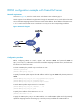
As shown in Figure 48, Switch is a Web server with the domain name whatever.3322.org.
Switch acquires the IP address through DHCP. Through DDNS service provided by www.3322.org,
Switch informs the DNS server of the latest mapping between its domain name and IP address. Switch
uses the DNS server to translate www.3322.org into the corresponding IP address.