
R21xx-HP FlexFabric 11900 Layer 3 IP Services Configuration Guide





119
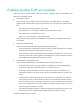
Step Command Remarks
1. Enter system view.
system-view N/A
2. Enable sending ICMP
error packets.
• Enable sending ICMP redirect packets:
ip redirects enable
• Enable sending ICMP time-exceeded
packets:
ip ttl-expires enable
• Enable sending ICMP destination
unreachable packets:
ip unreachables enable
The default settings are
disabled.
Sending ICMP error packets facilitates network management, but sending excessive ICMP packets
increases network traffic. A device's performance degrades if it receives a lot of malicious ICMP packets
that cause it to respond with ICMP error packets.
To prevent such problems, you can disable the device from sending ICMP error packets. A device
disabled from sending ICMP time-exceeded packets does not send ICMP TTL Expired packets but can still
send ICMP Fragment Reassembly Timeout packets.
Disabling forwarding ICMP fragments
Disabling forwarding ICMP fragments can protect your device from ICMP fragments attacks.
To disable forwarding ICMP fragments:
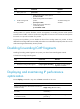
Step Command Remarks
1. Enter system view.
system-view N/A
2. Disable forwarding ICMP fragments.
ip icmp fragment discarding
By default, forwarding ICMP
fragments is enabled.
Displaying and maintaining IP performance
optimization
Execute display commands in any view and reset commands in user view.
Task Command
Display brief information about RawIP connections (in
standalone mode).
display rawip [ slot slot-number ]
Display brief information about RawIP connections (in
IRF mode).
display rawip [ chassis chassis-number slot
slot-number ]
Display detailed information about RawIP connections
(in standalone mode).
display rawip verbose [ slot slot-number [ pcb
pcb-index ] ]