
R21xx-HP FlexFabric 11900 Layer 3 IP Services Configuration Guide





138
changes to the probe state, and the device sends an NS message three times. If no response is received,
the device removes the ND entry.
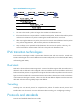
To set the aging timer for ND entries in stale state:
Ste
p
Command
Remarks
1. Enter system view.
system-view N/A
2. Set the aging timer for ND
entries in stale state.
ipv6 neighbor stale-aging aging-time
The default setting is four hours.
Minimizing link-local ND entries
Perform this task to minimize link-local ND entries assigned to the driver. Link-local ND entries refer to ND
entries comprising link-local addresses.
By default, the device assigns all ND entries to the driver. With this feature enabled, the device does not
add newly learned link-local ND entries whose link local addresses are not the next hop of any route into
the driver to save driver resources.
This feature affects only newly learned link-local ND entries rather than existing ND entries.
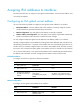
To minimize link-local ND entries:
Ste
p
Command
Remarks
1. Enter system view.
system-view N/A
2. Minimize link-local ND
entries.
ipv6 neighbor link-local
minimize
By default, the device assigns all ND entries
to the driver.
Setting the hop limit
Perform this task to implement the following functions:
• Set the value of the Hop Limit field for IPv6 packets sent by the device.
• If you use the undo ipv6 nd ra hop-limit unspecified command, the device sets the hop limit value
configured by this task in a sent RA message. A host receiving the RA message fills the value into
the Hop Limit field of sent IPv6 packets.
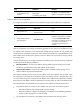
To set the hop limit:
Ste
p
Command
Remarks
1. Enter system view.
system-view N/A
2. Set the Hop Limit field in
the IP header.
ipv6 hop-limit value The default setting is 64.