
R21xx-HP FlexFabric 11900 Layer 3 IP Services Configuration Guide





169
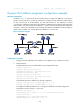
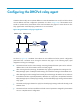
Figure 69 Operating process of a DHCPv6 relay agent
Configuration guidelines
• You can use the ipv6 dhcp relay server-address command to specify a maximum of eight DHCPv6
servers on the DHCP relay agent interface. The DHCPv6 relay agent forwards DHCP requests to all
the specified DHCPv6 servers.
• If a specific DHCPv6 server address is a link-local address or multicast address, you must specify an
outgoing interface by using the interface keyword in the ipv6 dhcp relay server-address command.
Otherwise, DHCPv6 packets may fail to reach the DHCPv6 server.
• Do not enable the DHCPv6 relay agent and DHCPv6 client on the same interface.
Configuration procedure
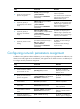
To configure the DHCPv6 relay agent:
Ste
p
Command
Remarks
1. Enter system view.
system-view N/A
2. Enter interface view.
interface interface-type
interface-number
N/A
3. Enable DHCPv6 relay agent
on the interface.
ipv6 dhcp select relay
By default, the DHCPv6 relay agent is
disabled on the interface.
4. Specify a DHCPv6 server.
ipv6 dhcp relay server-address
ipv6-address [ interface
interface-type interface-number ]
By default, no DHCPv6 server is
specified.
Displaying and maintaining the DHCPv6 relay
agent
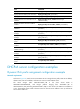
Execute display commands in any view and reset commands in user view.
(1) Solicit (contains a Rapid Commit option)
(4) Reply
DHCPv6 client DHCPv6 relay agent DHCPv6 server
(2) Relay-forward
(3) Relay-reply