
R21xx-HP FlexFabric 11900 Layer 3 IP Services Configuration Guide





183
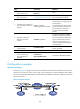
To configure a 6to4 tunnel:
Ste
p
Command
Remarks
1. Enter system view.
system-view N/A
2. Enter 6to4 tunnel interface
view.
interface tunnel number [ mode
ipv6-ipv4 6to4 ]
N/A
3. Specify an IPv6 address
for the tunnel interface.
For configuration details, see
"Configuring basic IPv6 settings."
No IPv6 address is configured for the
tunnel interface
by default.
4. Configure a source
address or source
interface for the tunnel
interface.
source { ip-address | interface-type
interface-number }
By default, no source address or
source interface is configured for the
tunnel interface.
The specified source address or the
primary IP address of the specified
source interface is used as the source
IP address of tunneled packets.
5. (Optional.) Set the DF bit
for tunneled packets.
tunnel dfbit enable
The DF bit is not set for tunneled
packets by default.
6. Return to system view.
quit N/A
7. (Optional.) Enable
dropping of IPv6 packets
using IPv4-compatible
IPv6 addresses.
tunnel discard
ipv4-compatible-packet
Optional.
The default setting is disabled.
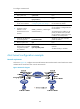
6to4 tunnel configuration example
Network requirements
As shown in Figure 78, configure a 6to4 tunnel between 6to4 switches Switch A and Switch B so Host A
and Host B can reach each other over the IPv4 network.
Figure 78 Network diagram