
R21xx-HP FlexFabric 11900 Layer 3 IP Services Configuration Guide






204
For information about tunnel interfaces and more configuration commands on a tunnel interface, see
"Configuring tunneling.."
F
or more information about the interface tunnel, source, destination, tunnel dfbit enable, and tunnel
discard ipv4-compatible-packet commands, see Layer 3—IP Services Command Reference.
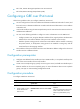
Configuring a GRE over IPv6 tunnel
Follow these guidelines when you configure a GRE over IPv6 tunnel:
• You must configure the tunnel source address and destination address at both ends of a tunnel, and
the tunnel source or destination address at one end must be the tunnel destination or source address
at the other end.
• Local tunnel interfaces using the same encapsulation protocol must not have the same tunnel source
and destination addresses.
• You can use the following methods to configure a route to a destination over the GRE tunnel:
{ Configure a static route, using the destination address of the original packet as the destination
address of the route and the address of the peer tunnel interface as the next hop.
{ Enable a dynamic routing protocol on both the tunnel interface and the interface connecting
the private network, so the dynamic routing protocol can establish a routing entry with the
tunnel interface as the outgoing interface.
• The IP address of the tunnel interface and the tunnel destination address configured on the tunnel
interface must be in different subnets.
Configuration prerequisites
• Configure an IPv6 address for the interface (such as a VLAN interface, or a Loopback interface) to
be used as the source interface of the tunnel interface.
• Create a service Loopback group, specify its service type as tunnel, and add an available Layer 2
Ethernet interface to the service Loopback group. For more information about service Loopback
groups, see Layer 2—LAN Switching Configuration Guide.
Configuration procedure
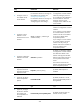
To configure a GRE over IPv6 tunnel:
Ste
p
Command
Remarks
1. Enter system view.
system-view N/A