
R21xx-HP FlexFabric 11900 Layer 3 IP Services Configuration Guide






205
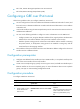
Ste
p
Command
Remarks
2. Create a GRE over IPv6 tunnel
interface and enter its view.
interface tunnel interface-number
mode gre ipv6
By default, the device has no
tunnel interface.
You must configure the same
tunnel mode on both ends of a
tunnel. Otherwise, packet delivery
may fail.
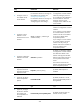
3. Configure an IPv4 or IPv6
address for the tunnel
interface.
For information about how to
assign an IPv4 address to an
interface, see ".Configuring IP
addres
sing"
For information about how to
assign an IPv6 address to an
interface, see "Configuring basic
IPv6 setti
ngs."
By default, no IPv4 or IPv6 address
is configured for a tunnel interface.
When the passenger protocol is
IPv4, configure an IPv4 address for
the tunnel interface. When the
passenger protocol is IPv6,
configure an IPv6 address for the
tunnel interface.
4. Configure a source IPv6
address or source interface for
the tunnel interface.
source { ipv6-address |
interface-type interface-number }
By default, no source IPv6 address
or interface is configured for a
tunnel interface.
If you configure a source IPv6
address for a tunnel interface, the
tunnel interface uses the source
IPv6 address as the source IPv6
address of the encapsulated
packets.
If you configure a source interface
for a tunnel interface, the tunnel
interface uses the IPv6 address of
the source interface as the source
IPv6 address of the encapsulated
packets.
5. Configure a destination IPv6
address for the tunnel
interface.
destination ipv6-address
By default, no destination IPv6
address is configured for a tunnel
interface.
The destination IPv6 address is the
IPv6 address of the physical
interface that the tunnel remote
end uses to receive packets from
the GRE tunnel.
The tunnel local end uses this
address as the destination IPv6
address of the encapsulated
packets.
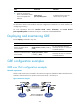
6. (Optional.) Enable GRE
keepalive and set the
keepalive interval and the
keepalive number.
keepalive [ interval [ times ] ]
By default, GRE keepalive is
disabled.
7. Return to system view.
quit N/A