
R21xx-HP FlexFabric 11900 Layer 3 IP Services Configuration Guide



23
Configuring IP unnumbered
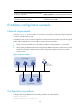
Typically, you assign an IP address to an interface either manually or through DHCP. If the IP addresses
are not enough, or the interface is used only occasionally, you can configure an interface to borrow an
IP address from other interfaces. This is called IP unnumbered and the interface borrowing the IP address
is called IP unnumbered interface.
You can use IP unnumbered to save IP addresses either when available IP addresses are inadequate or
when an interface is brought up only for occasional use.
Configuration guidelines
• An interface cannot borrow an IP address from an unnumbered interface.
• Multiple interfaces can use the same unnumbered IP address.
• If an interface has multiple manually configured IP addresses, only the manually configured primary
IP address can be borrowed.
Configuration prerequisites
Assign an IP address to the interface from which you want to borrow the IP address. Alternatively, you
can configure the interface to obtain one through BOOTP or DHCP.
Configuration procedure
To configure IP unnumbered on an interface:
Step Command Remarks
1. Enter system view.
system-view N/A
2. Enter tunnel interface view.
interface tunnel number
Create a tunnel interface before
you enter the tunnel interface
view. For more information about
tunnel interfaces, see
"Configuring tunneling.."
3. Specify the interface to borrow the
IP address of the specified
interface.
ip address unnumbered
interface interface-type
interface-number
By default, the interface does not
borrow IP addresses from other
interfaces.
A dynamic routing protocol cannot be enabled on the interface where IP unnumbered is configured. To
enable the interface to communicate with other devices, configure a static route to the peer device on the
interface.
Displaying and maintaining IP addressing
Execute display commands in any view.