
R21xx-HP FlexFabric 11900 Layer 3 IP Services Configuration Guide





35
2.
IP address that was ever assigned to the client.
3. IP address designated by the Option 50 field in the DHCP-DISCOVER message sent by the client.
Option 50 is the Requested IP Address option. The client uses this option to specify the wanted IP
address in a DHCP-DISCOVER message. The content of Option 50 is user defined.
4. First assignable IP address found in the way discussed in "DHCP address pool."
5. IP address that was a conflict or passed its lease duration. If no IP address is assignable, the server
does not respond.
NOTE:
If a client moves to another subnet, the DHCP server selects an IP address in the address pool matchin
g
the
new subnet instead of assigning the IP address that was once assigned to the client.
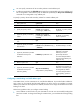
DHCP server configuration task list
Tasks at a
g
lance
(Required.) Configuring an address pool on the DHCP server
(Required.) Enabling DHCP
(Required.) Enabling the DHCP server on an interface
(Optional.) Applying an address pool on an interface
(Optional.) Configuring IP address conflict detection
(Optional.) Enabling handling of Option 82
(Optional.) Configuring DHCP server compatibility
Configuring an address pool on the DHCP server
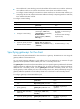
Configuration task list
Tasks at a
g
lance
(Required.) Creating a DHCP address pool
Perform at least one of the following tasks:
• Specifying IP address ranges for a DHCP address pool
• Specifying gateways for the client
• Specifying a domain name suffix for the client
• Specifying DNS servers for the client
• Specifying WINS servers and NetBIOS node type for the client
• Specifying BIMS server information for the client
• Specifying the TFTP server and boot file name for the client
• Specifying a server for the DHCP client
• Configuring Option 184 parameters for the client
• Configuring self-defined DHCP options