
R21xx-HP FlexFabric 11900 Layer 3 IP Services Configuration Guide





37
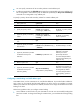
Ste
p
Command
Remarks
5. Enter address pool view.
dhcp server ip-pool pool-name N/A
6. Specify the primary subnet for
the address pool.
network network-address
[ mask-length | mask mask ]
By default, no primary subnet is
specified.
7. (Optional.) Specify the common
address range.
address range start-address
end-address
By default, no IP address range
is specified.
8. (Optional.) Specify an IP
address range for a DHCP user
class.
class class-name range start-address
end-address
By default, no IP address range
is specified for a user class.
The DHCP user class must
already exist.
To specify address ranges for
multiple DHCP user classes,
repeat this step.
9. (Optional.) Specify the address
lease duration.
expired { day day [ hour hour
[ minute minute [ second second ] ] ]
| unlimited }
The default setting is one day.
10. (Optional.) Exclude the
specified IP addresses in the
address pool from dynamic
allocation.
forbidden-ip ip-address&<1-8>
By default, all the IP addresses
in the DHCP address pool are
assignable.
To exclude multiple address
ranges from dynamic
allocation, repeat this step.
11. Return to system view.
quit N/A
12. (Optional.) Exclude the
specified IP addresses from
automatic allocation globally.
dhcp server forbidden-ip
start-ip-address [ end-ip-address ]
By default, except for the IP
address of the DHCP server
interface, all IP addresses in
address pools are assignable.
To exclude multiple IP address
ranges, repeat this step.
Specifying a primary subnet and multiple secondary subnets for a DHCP address pool
In scenarios where the DHCP server and the DHCP clients reside on the same subnet, the DHCP server
needs to assign addresses in different address ranges to the DHCP clients. To meet this need, you can
specify a primary subnet and multiple secondary subnets in an address pool. Upon receiving a client
request, the DHCP server selects an address from the primary subnet. If no assignable address is found,
the server selects an address from the secondary subnets in the order they are configured.
In scenarios where the DHCP server and the DHCP clients reside on different subnets and the DHCP
clients obtain IP addresses through a DHCP relay agent, the DHCP server needs to use the same address
pool to assign IP addresses to clients in different subnets. To meet this need, you can specify a primary
subnet and multiple secondary subnets in a DHCP address pool, which are consistent with the subnets
where the relay agent interfaces reside. Upon receiving a DHCP request forwarded by a relay agent, the
DHCP server reads the giaddr field in the request to find the corresponding subnet and selects an IP
address for the client.
Follow these guidelines when you specify a primary subnet and secondary subnets for a DHCP address
pool:
• You can specify only one primary subnet in each address pool. If you use the network command
multiple times, the most recent configuration takes effect.