
R21xx-HP FlexFabric 11900 Layer 3 IP Services Configuration Guide





39
• The IP address of a static binding cannot be the address of the DHCP server interface. Otherwise,
an IP address conflict occurs and the bound client cannot obtain an IP address correctly.
• To configure a static binding for a DHCP client whose interfaces use the same MAC address, you
must specify the client ID, rather than the MAC address to identify a requesting interface. Otherwise,
the IP address allocation will fail.
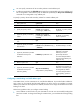
To configure a static binding:
Ste
p
Command
Remarks
1. Enter system view.
system-view N/A
2. Enter address pool view.
dhcp server ip-pool pool-name N/A
3. Configure a static binding.
static-bind ip-address ip-address
[ mask-length | mask mask ]
{ client-identifier client-identifier |
hardware-address
hardware-address [ ethernet |
token-ring ] }
By default, no static binding is
configured.
To add more static bindings,
repeat this step.
4. (Optional.) Specify the lease
duration for the IP address.
expired { day day [ hour hour
[ minute minute [ second second ] ] ]
| unlimited }
The default setting is 1 day.
Specifying gateways for the client
DHCP clients send packets destined for other networks to a gateway. The DHCP server can assign the
gateway address to the DHCP clients.
You can specify gateway addresses in each address pool on the DHCP server. A maximum of eight
gateways can be specified in DHCP address pool view or secondary subnet view.
The gateway-list command issued in DHCP address pool view specifies gateway addresses for all DHCP
clients that obtain IP addresses from this address pool. To specify gateways for clients that obtain IP
addresses from a secondary subnet, use the gateway-list command in secondary subnet view. If you
specify gateways in both address pool view and secondary subnet view, DHCP preferentially assign the
gateway addresses specified in the secondary subnet view to the clients on the secondary subnet.
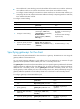
To configure gateways in the DHCP address pool:
Ste
p
Command
Remarks
1. Enter system view.
system-view N/A
2. Enter DHCP address pool
view.
dhcp server ip-pool pool-name N/A
3. Specify gateways.
gateway-list ip-address&<1-8>
By default, no gateway is
specified.
4. (Optional.) Enter secondary
subnet view
network network-address
[ mask-length | mask mask ]
secondary
N/A
5. (Optional.) Specify gateways.
gateway-list ip-address&<1-8>
By default, no gateway is
specified.