
R21xx-HP FlexFabric 11900 Layer 3 IP Services Configuration Guide





60
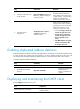
Task Command
Display relay entries on the DHCP relay agent.
display dhcp relay client-information [ interface
interface-type interface-number | ip ip-address
[ vpn-instance vpn-instance-name ] ]
Display packet statistics on the DHCP relay agent.
display dhcp relay statistics [ interface interface-type
interface-number ]
Clear relay entries on the DHCP relay agent.
reset dhcp relay client-information [ interface
interface-type interface-number | ip ip-address
[ vpn-instance vpn-instance-name ] ]
Clear packet statistics on the DHCP relay agent.
reset dhcp relay statistics [ interface interface-type
interface-number ]
DHCP relay agent configuration examples
DHCP relay agent configuration example
Network requirements
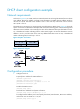
As shown in Figure 24, the DHCP relay agent forwards DHCP messages between DHCP clients and the
DHCP server.
The DHCP relay agent and server are on different subnets, so configure static or dynamic routing to make
them reachable to each other.
Perform the configuration on the DHCP server to guarantee the client-server communication. For DHCP
server configuration information, see "DHCP server configuration examples."
Figure 24 Network diagram
Configuration procedure
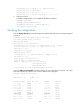
# Specify IP addresses for the interfaces. (Details not shown.)
# Enable DHCP.
<SwitchA> system-view
[SwitchA] dhcp enable
# Enable the DHCP relay agent on VLAN-interface 10.
[SwitchA] interface vlan-interface 10
Switch B
DHCP server
Switch A
DHCP relay agent
DHCP client DHCP client
DHCP clientDHCP client
Vlan-int20
10.1.1.2/24
Vlan-int10
10.10.1.1/24
Vlan-int20
10.1.1.1/24