
R21xx-HP FlexFabric 11900 Layer 3 IP Services Configuration Guide






74
To prevent such attacks, you can enable DHCP-REQUEST check. This feature uses DHCP snooping entries
to check incoming DHCP-REQUEST messages. If a matching entry is found for a message, this feature
compares the entry with the message information. If they are consistent, the message is considered as
valid and forwarded to the DHCP server. If they are different, the message is considered as a forged
message and is discarded. If no matching entry is found, the message is considered valid and forwarded
to the DHCP server.
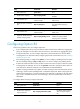
To enable DHCP-REQUEST check:
Ste
p
Command
Remarks
1. Enter system view.
system-view N/A
2. Enter interface view.
interface interface-type
interface-number
N/A
3. Enable DHCP-REQUEST check.
dhcp snooping check
request-message
By default, DHCP-REQUEST
check is disabled.
You can enable DHCP-REQUEST
check only on Layer 2 Ethernet
interfaces and Layer 2 aggregate
interfaces.
Configuring DHCP packet rate limit
Perform this task to configure the maximum rate at which an interface can receive DHCP packets. This
feature discards exceeding DHCP packets to prevent attacks that send large numbers of DHCP packets.
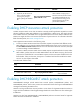
To configure DHCP packet rate limit:
Ste
p
Command
Remarks
1. Enter system view.
system-view N/A
2. Enter interface view.
interface interface-type
interface-number
N/A
3. Configure the maximum rate at
which the interface can receive
DHCP packets.
dhcp snooping rate-limit rate
By default, incoming DHCP
packets are not rate limited.
You can configure this command
only on Layer 2 Ethernet
interfaces and Layer 2 aggregate
interfaces.
The maximum rate configured on
a Layer 2 aggregate interface
applies to all its member
interfaces.
Displaying and maintaining DHCP snooping
Execute display commands in any view, and reset commands in user view.