
R21xx-HP FlexFabric 11900 Layer 3 IP Services Configuration Guide






76
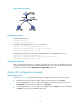
Figure 29 Network diagram
Configuration procedure
# Enable DHCP snooping.
<SwitchB> system-view
[SwitchB] dhcp snooping enable
# Configure Ten-GigabitEthernet 1/0/1 as a trusted port.
[SwitchB] interface Ten-GigabitEthernet 1/0/1
[SwitchB-Ten-GigabitEthernet1/0/1] dhcp snooping trust
[SwitchB-Ten-GigabitEthernet1/0/1] quit
# Enable DHCP snooping to record clients' IP-MAC bindings on Ten-GigabitEthernet 1/0/2.
[SwitchB] interface Ten-GigabitEthernet 1/0/2
[SwitchB-Ten-GigabitEthernet1/0/2] dhcp snooping binding record
[SwitchB-Ten-GigabitEthernet1/0/2] quit
Verifying the configuration
After the preceding configuration is complete, the DHCP client can obtain an IP address and other
configuration parameters only from the authorized DHCP server. You can view the DHCP snooping entry
recorded for the client with the display dhcp snooping binding command.
Option 82 configuration example
Network requirements
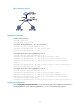
As shown in Figure 30, enable DHCP snooping and configure Option 82 on Switch B as follows:
• Configure the handling strategy for DHCP requests containing Option 82 as replace.
• On Ten-GigabitEthernet 1/0/2, configure the padding content for the circuit ID sub-option as
company001 and for the remote ID sub-option as device001.
• On Ten-GigabitEthernet 1/0/3, configure the padding format as verbose, access node identifier
as sysname, and code type as ascii for Option 82.