
R21xx-HP FlexFabric 11900 Layer 3 IP Services Configuration Guide






83
• The device serves as a DNS proxy and is specified as a DNS server on the hosts. After the dial-up
connection is established through the dial-up interface, the device dynamically obtains the DNS
server address through DHCP or other autoconfiguration mechanisms.
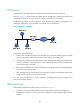
Figure 33 DNS spoofing application
DNS spoofing enables the DNS proxy to send a spoofed reply with a configured IP address even if it
cannot reach the DNS server. Without DNS spoofing, the proxy does not answer or forward a DNS
request if it can neither find a local matching DNS entry nor can it reach the DNS server.
In the network as shown in Figure 33, a ho
st accesses the HTTP server in following these steps:
1. The host sends a DNS request to the device to resolve the domain name of the HTTP server into an
IP address.
2. Upon receiving the request, the device searches the local static and dynamic DNS entries for a
match. If the dial-up connection has not been established, the device does not know the DNS
server address, or the DNS server address configured on the device is not reachable, the device
spoofs the host by replying a configured IP address. The TTL of the DNS reply is 0. The device must
have a route to the IP address with the dial-up interface as the output interface.
The IP address configured for DNS spoofing is not the actual IP address of the requested domain
name, so the TTL of the DNS reply is set to 0 to prevent the DNS client from generating incorrect
DNS entries.
3. Upon receiving the reply, the host sends an HTTP request to the replied IP address.
4. When forwarding the HTTP request through the dial-up interface, the device establishes a dial-up
connection with the network, and dynamically obtains the DNS server address through DHCP or
another autoconfiguration mechanism.
5. When the DNS reply ages out, the host sends a DNS request to the device again.
6. Then the device operates the same as a DNS proxy. For more information, see "DNS proxy."
7. After obtaining the IP address of the HTTP server, the host can access the HTTP server.
DNS configuration task list