
R21xx-HP FlexFabric 11900 MPLS Command Reference

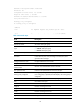

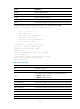
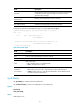
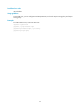
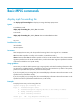
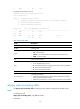
Table Of Contents
- Title Page
- Contents
- MCE commands
- description
- display bgp group ipv4 vpn-instance
- display bgp peer ipv4 vpn-instance
- display ip vpn-instance
- domain-id
- export route-policy
- ext-community-type
- import route-policy
- ip binding vpn-instance
- ip vpn-instance
- ipv4-family
- route-distinguisher
- route-tag
- routing-table limit
- vpn-instance-capability simple
- vpn-target
- IPv6 MCE commands
- Basic MPLS commands
- Static LSP commands
- LDP commands
- accept-label
- advertise-label
- backoff
- display mpls ldp discovery
- display mpls ldp fec
- display mpls ldp interface
- display mpls ldp lsp
- display mpls ldp parameter
- display mpls ldp peer
- display mpls ldp summary
- graceful-restart
- graceful-restart timer
- label-distribution
- loop-detect
- lsp-trigger
- lsr-id
- maxhops
- md5-authentication
- mpls ldp
- mpls ldp enable
- mpls ldp timer
- mpls ldp transport-address
- pv-limit
- reset mpls ldp
- session protection
- targeted-peer
- vpn-instance
- Tunnel policy commands
- MPLS L3VPN commands
- description (VPN instance view)
- display bgp group vpnv4
- display bgp peer vpnv4
- display bgp routing-table ipv4 unicast inlabel
- display bgp routing-table ipv4 unicast outlabel
- display bgp routing-table vpnv4
- display bgp routing-table vpnv4 advertise-info
- display bgp routing-table vpnv4 as-path-acl
- display bgp routing-table vpnv4 community-list
- display bgp routing-table vpnv4 inlabel
- display bgp routing-table vpnv4 outlabel
- display bgp routing-table vpnv4 peer
- display bgp routing-table vpnv4 statistics
- display ip vpn-instance
- domain-id
- export route-policy
- ext-community-type
- import route-policy
- ip binding vpn-instance
- ip vpn-instance (system view)
- ipv4-family (VPN instance view)
- ipv4-family vpnv4
- nesting-vpn
- peer next-hop-invariable
- peer upe
- peer upe route-policy
- policy vpn-target
- refresh bgp vpnv4
- reset bgp vpnv4
- route-distinguisher (VPN instance view)
- route-tag
- routing-table limit
- rr-filter
- tnl-policy (VPN instance view/IPv4 VPN view/IPv6 VPN view)
- vpn popgo
- vpn-target (VPN instance view/IPv4 VPN view/IPv6 VPN view)
- IPv6 MPLS L3VPN commands
- display bgp group vpnv6
- display bgp peer vpnv6
- display bgp routing-table vpnv6
- display bgp routing-table vpnv6 advertise-info
- display bgp routing-table vpnv6 as-path-acl
- display bgp routing-table vpnv6 community-list
- display bgp routing-table vpnv6 inlabel
- display bgp routing-table vpnv6 outlabel
- display bgp routing-table vpnv6 peer
- display bgp routing-table vpnv6 statistics
- ipv6-family (VPN instance view)
- ipv6-family vpnv6
- policy vpn-target
- refresh bgp vpnv6
- reset bgp vpnv6
- rr-filter
- MPLS L2VPN commands
- VPLS commands
- backup-peer
- description
- display l2vpn ldp
- display l2vpn forwarding
- display l2vpn mac-address
- display l2vpn pw
- display l2vpn pw-class
- display l2vpn service-instance
- display l2vpn vsi
- encapsulation
- l2vpn enable
- l2vpn switchover
- mac-learning enable
- mtu
- peer
- pw-class
- pw-type
- pwsignaling
- reset l2vpn mac-address
- revertive
- service-instance
- shutdown
- vsi
- xconnect vsi
- Support and other resources
- Index
21
Field Description
Threshold
Percentage of received routes from the peer to maximum routes allowed
to learn from the peer. If the percentage is reached, the system
generates alarm messages.
Minimum time between
advertisements
Minimum route advertisement interval in seconds.
Optional capabilities Optional capabilities supported by the local end.
Peer Preferred Value Preferred value specified for the routes from the peer.
# Display log information about BGP IPv6 peer 1::2 in the VPN instance vpn1.
<Sysname> display bgp peer ipv6 vpn-instance vpn1 3::3 log-info
Peer : 3::3
Date Time State Notification
Error/SubError
27-Mar-2011 15:36:12 Down Receive notification with error 6/4
Cease/Administrative Reset
27-Mar-2011 15:34:29 Up
Table 8 Command output
Field Description
Peer IP address of the peer.
Date Date on which the Notification was sent or received.
Time Time at which the Notification was sent or received.
State
BGP session state:
• Up—The BGP session is in Established state.
• Down—The BGP session is down.
Notification
Error/SubError
Error code of the Notification, indicating the cause of why the BGP session is down.
• Error—Refers to the error code, which identifies the type of the Notification.
• SubError—Refers to the error subcode of the Notification, which identifies specific
information about the reported error.
ipv6-family
Use ipv6-family to create and enter IPv6 VPN view.
Use undo ipv6-family to remove all configurations in IPv6 VPN view.
Syntax
ipv6-family
undo ipv6-family
Views
VPN instance view