
R21xx-HP FlexFabric 11900 MPLS Configuration Guide



5
Configuring VPN instances on an MCE device
Configuring VPN instances is required in all MCE networking schemes.
VPN instances isolate not only VPN routes from public network routes, but also routes among VPNs. This
feature allows VPN instances to be used in networking scenarios besides MCE.
Creating a VPN instance
You can configure a description for a VPN instance to record its related information, such as its
relationship with a certain VPN.
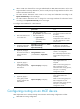
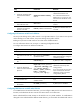
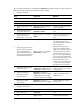
To create and configure a VPN instance:
Ste
p
Command
Remarks
1. Enter system view.
system-view N/A
2. Create a VPN instance and
enter VPN instance view.
ip vpn-instance vpn-instance-name
By default, no VPN instance is
created.
3. Configure an RD for the VPN
instance.
route-distinguisher
route-distinguisher
By default, no RD is specified for
the VPN instance.
4. (Optional) Configure a
description for the VPN
instance.
description text
By default, no description is
configured for the VPN instance.
NOTE:
To configure BGP for a VPN instance on the MCE, you must configure an RD for the VPN instance.
Associating a VPN instance with an interface
After configuring a VPN instance, you must associate the VPN instance with the interfaces connected to
the VPN site or the PE.
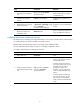
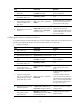
To associate a VPN instance with an interface:
Ste
p
Command
Remarks
1. Enter system view.
system-view N/A
2. Enter interface view.
interface interface-type
interface-number
N/A
3. Associate the current interface
with a VPN instance.
ip binding vpn-instance
vpn-instance-name
By default, no VPN instance is
associated with an interface.
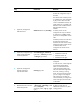
The ip binding vpn-instance
command deletes the IP address of
the current interface. You must
reconfigure an IP address for the
interface after configuring the
command.
Configuring route attributes for a VPN instance
The MCE controls VPN route advertisement as follows: