
R21xx-HP FlexFabric 11900 MPLS Configuration Guide

106
Configuration prerequisites
Before you configure basic MPLS L3VPN, complete the following tasks:
• Configure an IGP for the MPLS backbone (on the PEs and Ps) to achieve IP connectivity.
• Configure basic MPLS for the MPLS backbone.
• Configure MPLS LDP for the MPLS backbone so that LDP LSPs can be established.
• Configure IP addresses for CE interfaces connected to PEs.
Configuring VPN instances
VPN instances isolate VPN routes from public network routes and routes among VPNs. This feature
allows VPN instances to be used in network scenarios besides MPLS L3VPNs.
All VPN instance configurations are performed on PEs or MCEs.
Creating a VPN instance
A VPN instance is a collection of the VPN membership and routing rules of its associated site. A VPN
instance may not correspond to one VPN.
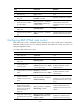
To create and configure a VPN instance:
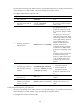
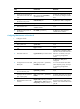
Ste
p
Command
Remarks
1. Enter system view.
system-view N/A
2. Create a VPN instance and
enter VPN instance view.
ip vpn-instance vpn-instance-name
By default, no VPN instance is
created.
3. Configure an RD for the VPN
instance.
route-distinguisher
route-distinguisher
By default, no RD is specified for a
VPN instance.
4. (Optional.) Configure a
description for the VPN
instance.
description text
By default, no description is
configured for a VPN instance.
Associating a VPN instance with an interface
After creating and configuring a VPN instance, associate the VPN instance with the interface connected
to the CE.
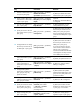
To associate a VPN instance with an interface:
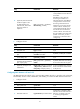
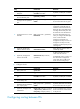
Ste
p
Command
Remarks
1. Enter system view. system-view N/A
2. Enter interface view.
interface interface-type
interface-number
N/A
3. Associate a VPN instance
with the interface.
ip binding vpn-instance
vpn-instance-name
By default, no VPN instance is
associated with an interface.
The ip binding vpn-instance
command deletes the IP address of
the current interface. You must
re-configure an IP address for the
interface after configuring the
command.