
R21xx-HP FlexFabric 11900 MPLS Configuration Guide

107
Configuring route related attributes for a VPN instance
VPN routes are controlled and advertised on a PE using the following process:
• When a VPN route learned from a site gets redistributed into BGP, BGP associates it with a route
target extended community attribute list, which is usually the export target attribute of the VPN
instance associated with the site.
• The VPN instance determines which routes it can accept and redistribute according to the
import-extcommunity in the route target.
• The VPN instance determines how to change the route target attributes for routes to be advertised
according to the export-extcommunity in the route target.
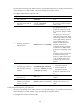
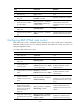
To configure route related attributes for a VPN instance:
Ste
p
Command
Remarks
1. Enter system view.
system-view N/A
2. Enter VPN instance view
or IPv4 VPN view
• Enter VPN instance view:
ip vpn-instance vpn-instance-name
• Enter IPv4 VPN view:
a. ip vpn-instance
vpn-instance-name
b. ipv4-family
Configurations made in VPN
instance view apply to both IPv4
VPN and IPv6 VPN.
IPv4 VPN prefers the
configurations in IPv4 VPN view
over the configurations in VPN
instance view.
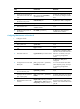
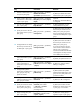
3. Configure route targets.
vpn-target vpn-target&<1-8> [ both |
export-extcommunity |
import-extcommunity ]
By default, no route targets are
configured.
4. Set the maximum
number of routes
allowed.
routing-table limit number
{ warn-threshold | simply-alert }
Support for this command depends
on the device model.
By default, no route limit is
configured for the VPN instance.
This setting prevents a VPN
instance from learning too many
routes.
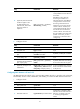
5. Apply an import routing
policy.
import route-policy route-policy
By default, all routes matching the
import target attribute are
accepted.
The specified routing policy must
have been created.
For information about routing
policies, see Layer 3—IP Routing
Configuration Guide.
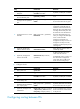
6. Apply an export routing
policy.
export route-policy route-policy
By default, routes to be advertised
are not filtered.
The specified routing policy must
have been created.
For information about routing
policies, see Layer 3—IP Routing
Configuration Guide.