
R21xx-HP FlexFabric 11900 MPLS Configuration Guide

108
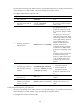
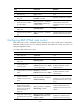
Ste
p
Command
Remarks
7. Apply a tunnel policy to
the VPN instance.
tnl-policy tunnel-policy-name
By default, only one tunnel is
selected (no load balancing) in this
order: LSP tunnel, GRE tunnel,
CR-LSP tunnel.
The specified tunnel policy must
have been created.
For information about tunnel
policies, see Configuring tunnel
policies.
Configuring routing between a PE and a CE
You can configure static routing, RIP, OSPF, IS-IS, EBGP, or IBGP between a PE and a CE.
Configuring static routing between a PE and a CE
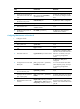
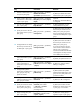
Ste
p
Command
Remarks
1. Enter system view.
system-view N/A
2. Configure a static route
for a VPN instance.
ip route-static vpn-instance
s-vpn-instance-name dest-address { mask |
mask-length } { next-hop-address [ public ]
[ track track-entry-number ] | interface-type
interface-number [ next-hop-address ] |
vpn-instance d-vpn-instance-name
next-hop-address [ track track-entry-number ] }
[ permanent ] [ preference preference-value ]
[ tag tag-value ] [ description description-text ]
By default, no static route is
configured for a VPN
instance.
Perform this configuration on
the PE. On the CE, configure
a common static route.
For more information about
static routing, see Layer 3—IP
Routing Configuration Guide.
Configuring RIP between a PE and a CE
A RIP process belongs to the public network or a single VPN instance. If you create a RIP process without
binding it to a VPN instance, the process belongs to the public network.
To configure RIP between a PE and a CE:
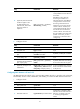
Ste
p
Command
Remarks
1. Enter system view. system-view N/A
2. Create a RIP process for a
VPN instance and enter RIP
view.
rip [ process-id ] vpn-instance
vpn-instance-name
Perform this configuration on the
PE. On the CE, create a common
RIP process.
3. Enable RIP on the interface
attached to the specified
network.
network network-address
By default, RIP is disabled on an
interface.
Configuring OSPF between a PE and a CE
An OSPF process that is bound to a VPN instance does not use the public network router ID configured
in system view. Therefore, you must specify a router ID when starting a process or configure an IP address
for at least one interface of the VPN instance.